Overview
Users Management allows IT Administrators to manage user accounts for the system. The system supports
multiple user types: internal admin users, external users (airport, TEF, IATA), and customer users.
Navigation
Navigate to Administration → Users
Submenu Options
- View Users: View all internal/admin user accounts
- Add User: Create a new internal/admin user account
- View External Users: View all external user accounts (Airport, TEF, IATA)
- Add External User: Create a new external user account
- View Customer Users: View all customer portal user accounts
- Add Customer User: Create a new customer portal user account
User Types
- Internal Users (Admin): System administrators and internal staff with full access
to admin portal
- External Airport Users: Airport staff with access to airport-specific portal and
features
- External TEF Users: TEF (Tourism Enhancement Fund) staff with access to TEF portal
- External IATA Users: IATA staff with access to IATA-specific portal
- Customer Users: Customer portal users who can view invoices and make payments for
their organization
Internal Users (Admin)
Internal users are system administrators and internal staff who have access to the main admin portal with
full system capabilities.
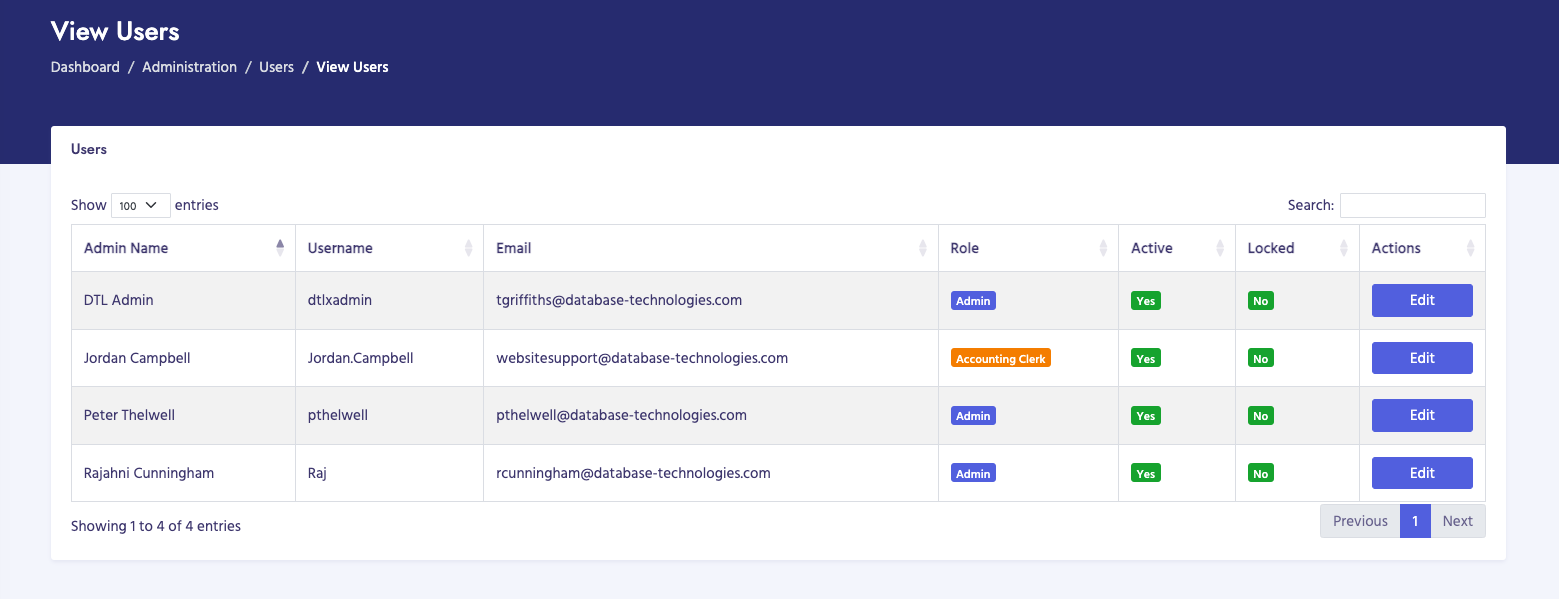
How to View Internal Users
- Navigate to Administration → Users → View Users
- The page displays a table of all internal/admin users
- Use search to find specific users by name, email, or username
- Click on column headers to sort
- Click on a user to view or edit details
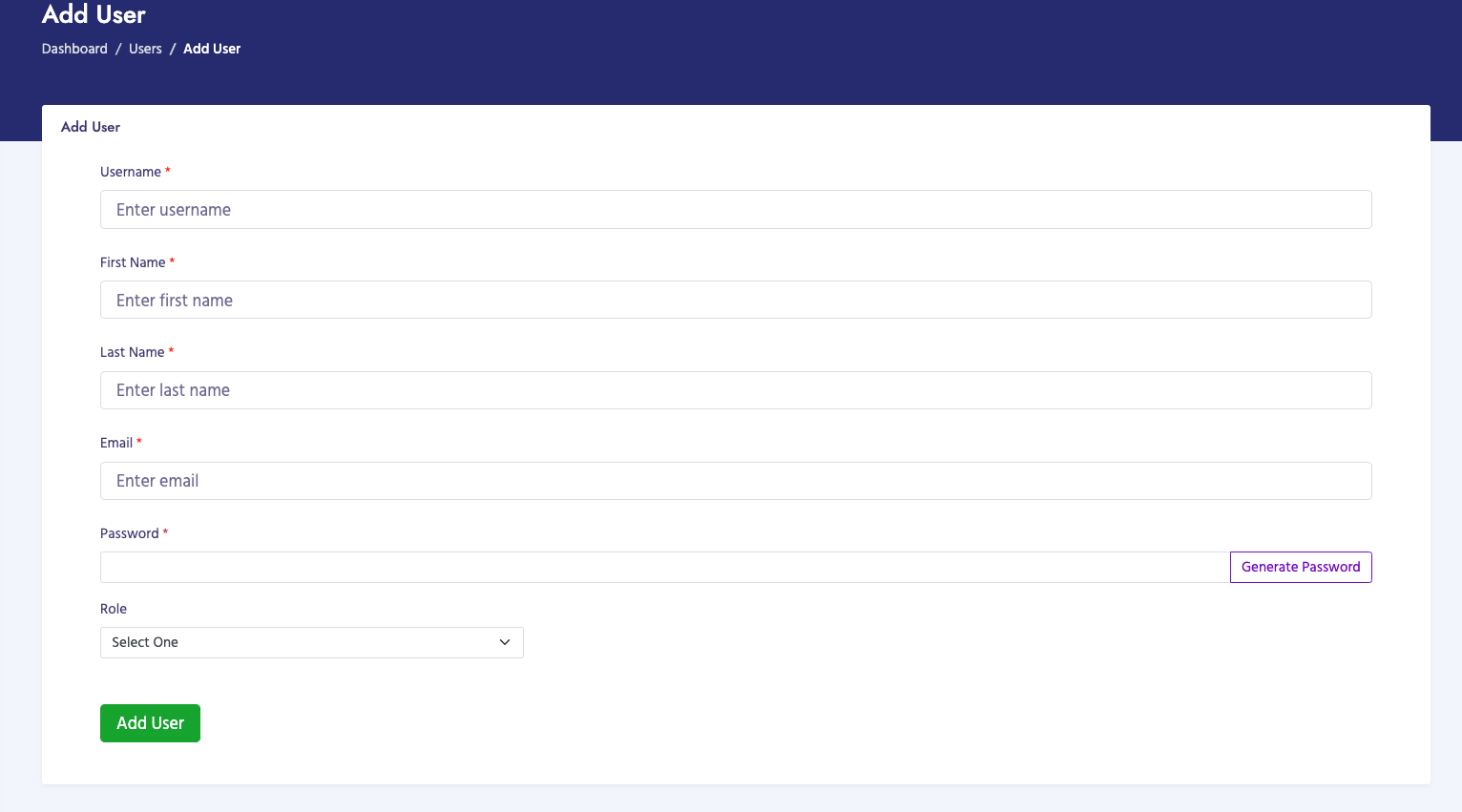
How to Add an Internal User
- Navigate to Administration → Users → Add User
- Enter user information:
- First Name: User's first name (required)
- Last Name: User's last name (required)
- Email: Email address (required, must be unique)
- Username: Login username (required, must be unique)
- Password: Initial password (required)
- Role: Select user role from dropdown (determines permissions)
- Status: Active or Inactive
- Click Add User to save
Screenshot: View Internal Users Page
Replace with:
images/manual/view-internal-users.png
Screenshot: Add Internal User Page
Replace with:
images/manual/add-internal-user.png
External Users
External users are staff from external organizations (Airport, TEF, IATA) who have access to specific
portals with limited functionality based on their organization type.
External User Types
- IATA Users: Staff from IATA with access to IATA portal
- TEF Users: Staff from Tourism Enhancement Fund with access to TEF portal
- Airport Users: Airport staff with access to airport portal (requires airport
selection)
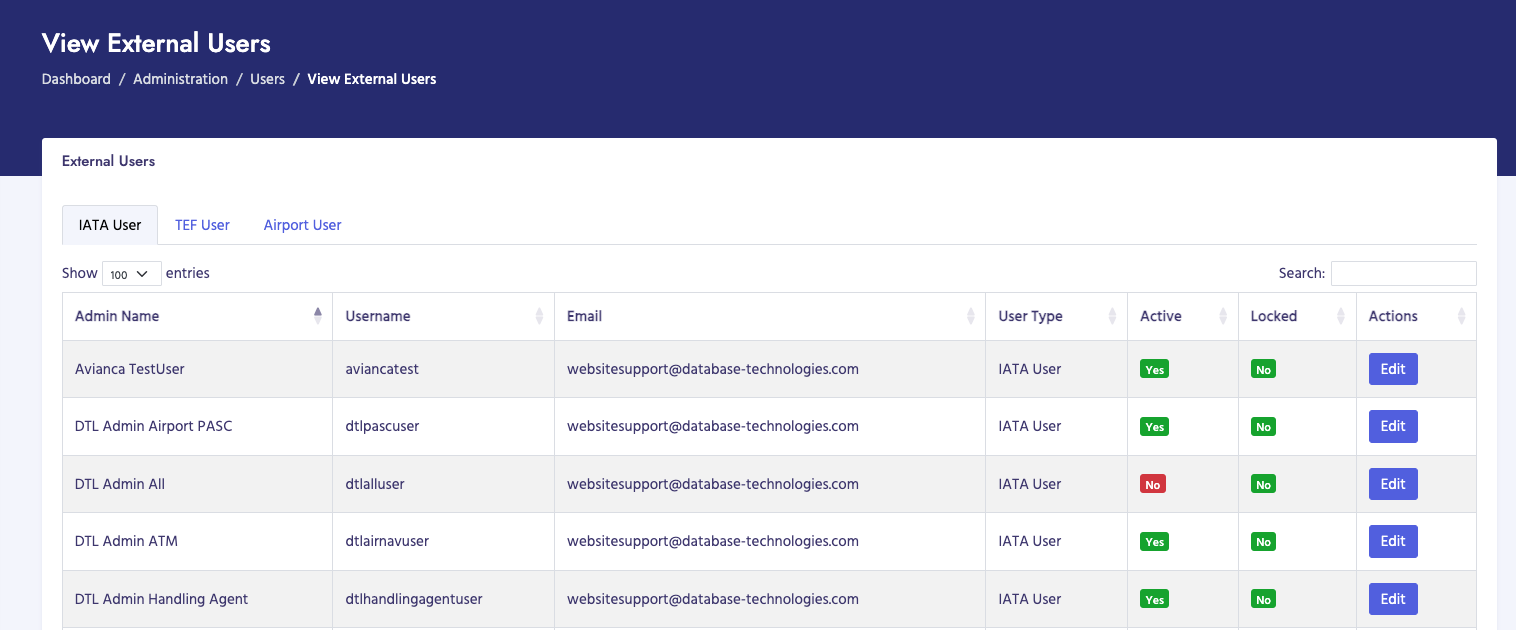
How to View External Users
- Navigate to Administration → Users → View External Users
- The page displays a table of all external users
- Users are shown with their type (IATA, TEF, or Airport)
- Use search to find specific users
- Click on column headers to sort
- Click on a user to view or edit details
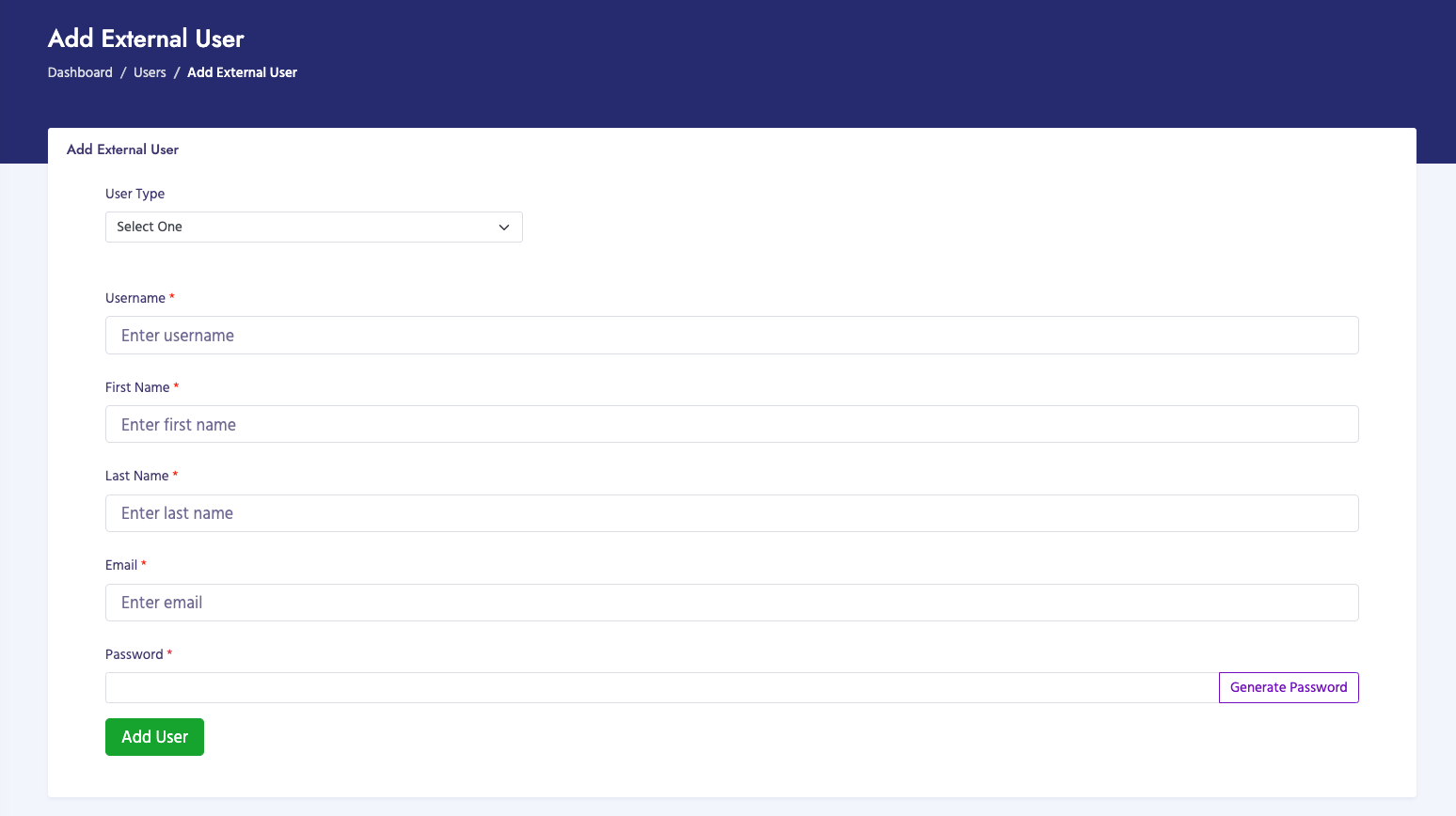
How to Add an External User
- Navigate to Administration → Users → Add External User
- Select the User Type from dropdown:
- IATA User: For IATA staff
- TEF User: For TEF staff
- Airport User: For airport staff (requires airport selection)
- Enter user information:
- Username: Login username (required, must be unique)
- First Name: User's first name (required)
- Last Name: User's last name (required)
- Email: Email address (required, must be unique)
- Password: Initial password (required)
- Airport: If Airport User type selected, choose the airport (required for
airport users)
- Status: Active or Inactive
- Click Add External User to save
External User Information
Each external user record includes:
- User ID: Unique identifier
- User Type: IATA User, TEF User, or Airport User
- Name: First and last name
- Email: Email address
- Username: Login username
- Airport: Associated airport (for Airport Users only)
- Status: Active or Inactive
- Last Login: Last login date and time
- Created Date: When account was created
Screenshot: View External Users Page
Replace with:
images/manual/view-external-users.png
Screenshot: Add External User Page
Replace with:
images/manual/add-external-user.png
Customer Users
Customer users are users who have access to the customer portal. They can view invoices, make payments,
and access customer-specific features for their organization. Customer users are linked to customer
accounts (PACID).
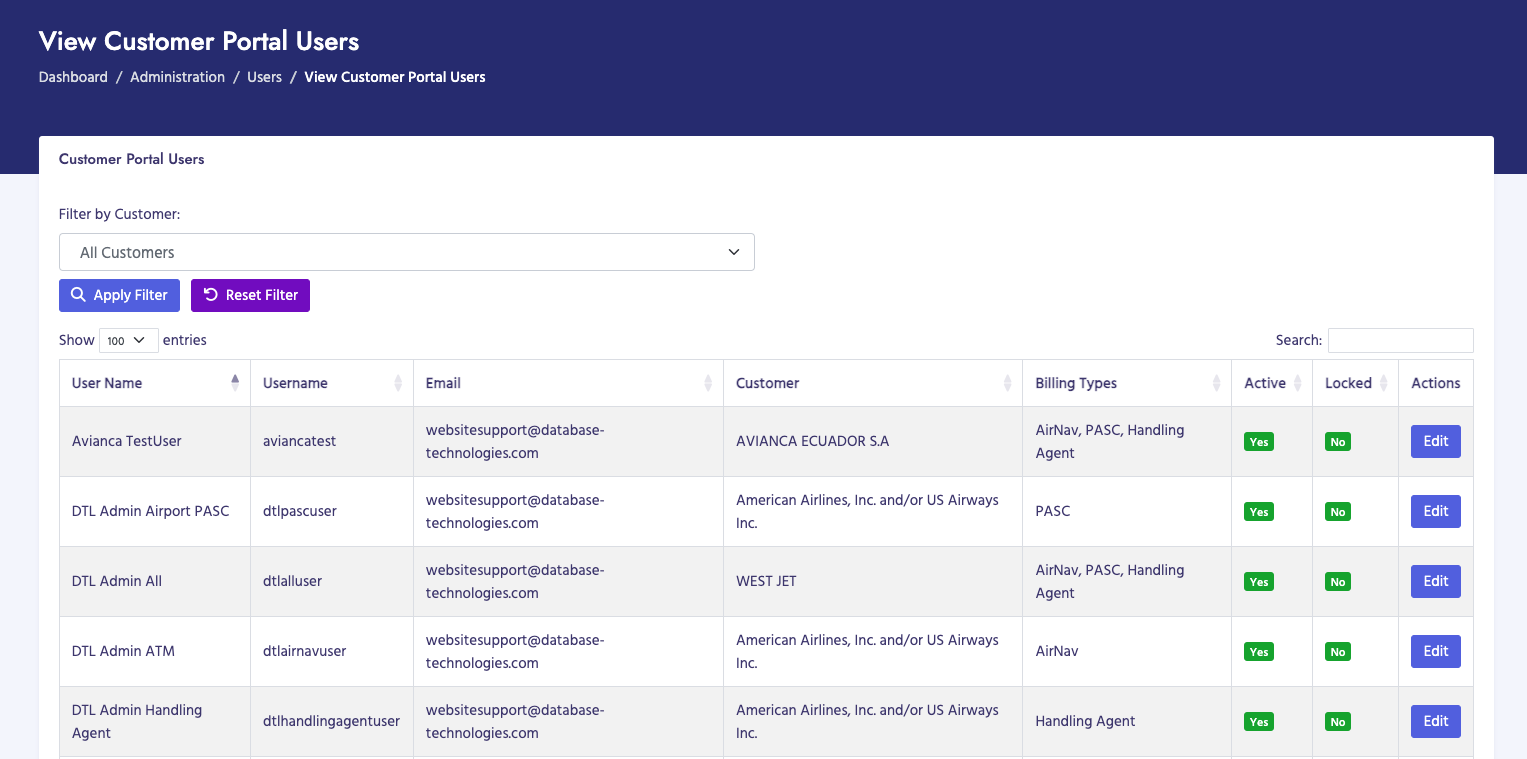
How to View Customer Users
- Navigate to Administration → Users → View Customer Users
- The page displays a table of all customer portal users
- Users are shown with their associated customer (PACID and customer name)
- Use search to find specific users or customers
- Click on column headers to sort
- Click on a user to view or edit details
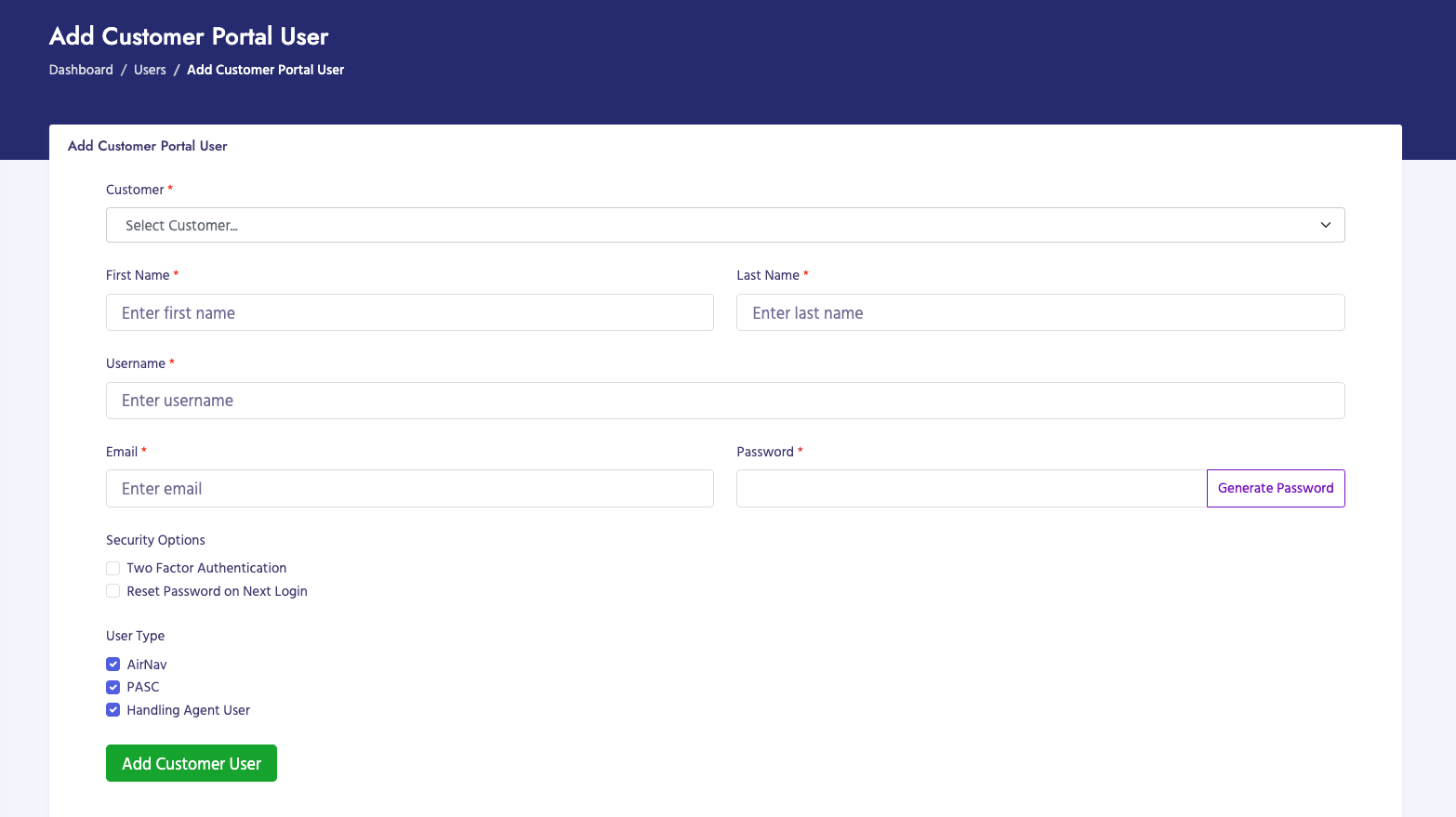
How to Add a Customer User
- Navigate to Administration → Users → Add Customer User
- Select the Customer from dropdown (required):
- Uses Select2 for enhanced search
- Shows customer name and PACID
- Customer must exist in the system
- Enter user information:
- First Name: User's first name (required)
- Last Name: User's last name (required)
- Username: Login username (required, must be unique)
- Email: Email address (required, must be unique)
- Password: Initial password (required)
- Status: Active or Inactive
- Click Add Customer User to save
Customer User Information
Each customer user record includes:
- User ID: Unique identifier
- Customer: Associated customer name and PACID
- Name: First and last name
- Email: Email address
- Username: Login username
- Status: Active or Inactive
- Last Login: Last login date and time
- Created Date: When account was created
Screenshot: View Customer Users Page
Replace with:
images/manual/view-customer-users.png
Screenshot: Add Customer User Page
Replace with:
images/manual/add-customer-user.png
Customer User Capabilities
Customer users can:
- View invoices for their organization
- Make payments on invoices
- View payment history
- Access customer portal features
- View account information
User Information Summary
All user types share common information fields:
- User ID: Unique identifier
- Name: First and last name
- Email: Email address (must be unique)
- Username: Login username (must be unique)
- Status: Active or Inactive
- Last Login: Last login date and time
- Created Date: When account was created
Important Notes
- Only IT Administrators can manage users (requires "Administration - Users" permission)
- Internal users have roles that determine permissions in the admin portal
- External users have access to specific portals based on their type
- Customer users are automatically linked to customer accounts (PACID)
- Inactive users cannot log in
- Email addresses and usernames must be unique across all user types
- Airport users require an airport to be selected during creation
- Customer users can only access data for their associated customer account